
Your Mini Basket

Your basket is currently empty.

CAM Post Processors

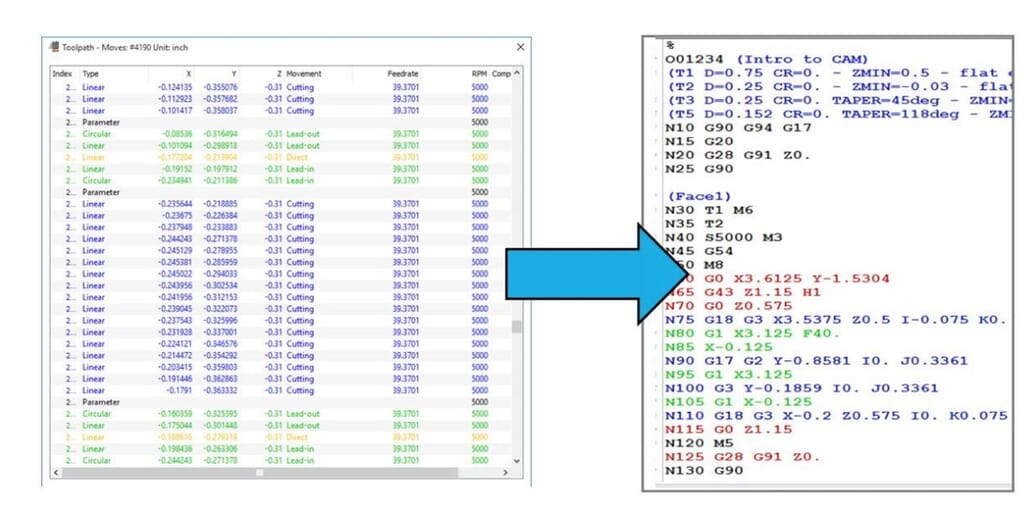
A post-processor converts the toolpaths displayed within your CAM system into NC code so you can run them on a specific CNC machine. When you create NC code, you need to choose the correct post-processor file for the CNC machine on which the program for cutting the part is to be run. Thankfully, there is a vast library of Post Processors available for the Autodesk CAM products.

Screen-Shot-2020-11-24-at-11.03.27.jpg?w=1024&h=516&scale

CAM Post Processors for the Autodesk CAM Products

PowerMill

Users of PowerMill can find installed Post Processors in the following folder:

 C:\Users\Public\Documents\Autodesk\Manufacturing Post Processor Utility (version)\Generic

FeatureCAM

Users of FeatureCAM can find installed Post Processors in the following folder:

 C:\Program Files\Autodesk\FeatureCAM (version)\Posts

Fusion 360 & Inventor CAM (HSM)

Fusion 360 & Inventor CAM (HSM) users, you have access to the post library where you can run a search or filter by machine type and/or control.

Need some advice?

If you cannot find what you want or need some advice, then please contact the CAM team. We will either find you a suitable post processor or quote for creating one for you.

“A CAM system is only as good as its Post Processors”
D. Whiteley B.Eng.(Tech)
StanfordMarsh-20250827_PhotoshootHighRes-129-scaled.jpg?w=150&h=150&scale

Mar 06, 2026

The Importance of Staff Training: How Learning Drives Performance, Retention and Growth

Read more
Cadspec-Consultancy-Thumbnail-2-scaled.jpg?w=150&h=150&scale

Mar 06, 2026

Future Proofing Your Talent: Why Training and Empowerment Matter

Read more
StanfordMarsh-20250827_PhotoshootHighRes-143-scaled.jpg?w=150&h=150&scale

Feb 16, 2026

Understanding the Cadspec Skills Gap Analysis: Unlocking Your Team’s Full Potential

Read more
StanfordMarsh-20250827_PhotoshootHighRes-155-scaled.jpg?w=150&h=150&scale

Feb 10, 2026

The Ageing Workforce: Preparing Your Business for the Future

Read more